
KurtCast for schools
Assemblies, lessons, exams and prize-giving
One free app for every screen in your school: songs for assembly, quizzes, the exam clock and a slide for every prize-winner, made from a spreadsheet.
Version 0.1.0 · Windows 127 MB · Mac 230 MB · How to install it
For primary and secondary schools, colleges and teachers.
How KurtCast helps
Assemblies, lessons, exams and prize-giving
Assemblies
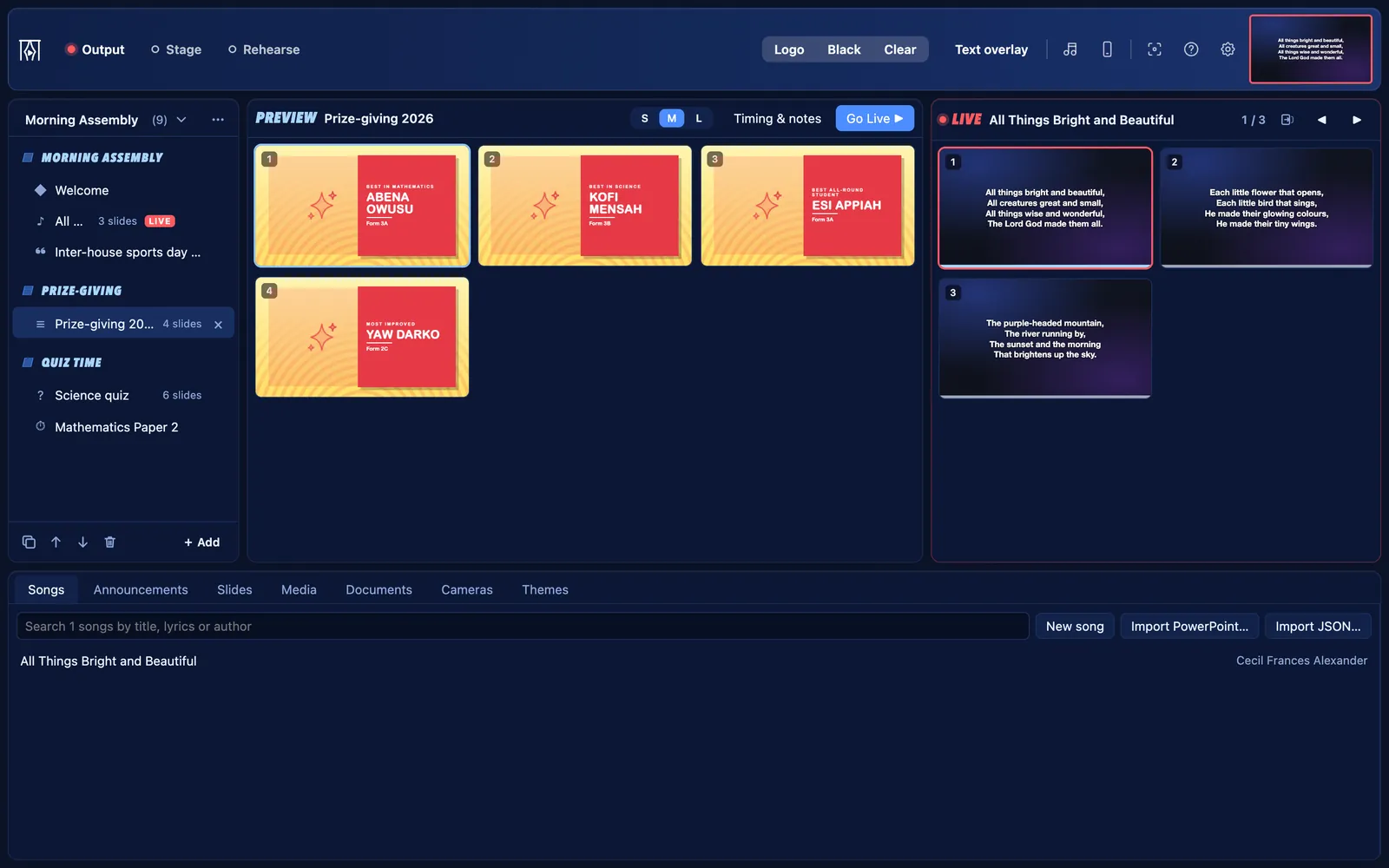
- Build the assembly programme with Groups and parts, and show the order with the agenda slide.
- Put the words of the school song or anthem on screen, and jump to any verse from the keyboard.
- Run announcements as a banner along the bottom while pupils come in.
Prize-giving and graduation
- Paste names straight from a spreadsheet with Name list…. KurtCast finds the names column and puts the award and class under each name.
- Every pupil gets their own slide, in order. Press → as each name is called.
Quizzes and quiz competitions
- Type questions as plain text and mark the right answer. Each question becomes two slides: the question, then the answer on the next click.
Exams
- The Exam clock shows the time remaining large, with the time now and the finishing time either side.
- Give a few extra minutes with +1 min while it runs.
Lessons
- Show PDFs, PowerPoint slide shows, pictures and videos. Use a phone as a camera to show a book or an experiment on the big screen.
- Live notes puts points on the screen as you teach.
Settings → Features
What “School” starts with
Choose School when KurtCast first opens, and these parts are on. The others are one switch away, and nothing is ever deleted.
On from the start
- Songs: the Songs tab, the song finder and songs on the remote
- Announcements: banners along the bottom of the screen, and countdowns
- Slides: slides of your own, name lists and quiz questions
- Media: pictures, videos, slideshows and web pages
- Documents: pDFs and PowerPoint slide shows
- Cameras: webcams, capture cards, phones and speaker captions
- Live notes: type points on the screen while someone speaks
- Quiz questions: a question, then its answer on the next click
Also always there: themes, the stage display, remote control, the OBS and vMix overlay, backups and the PIN lock.
Switch on when you need them
- Scriptures: the Scriptures tab, Bibles and Bible search on the remote
- Song packs and hymn numbers: install hymnals and type a number to find a hymn
- Second language: songs and passages in two languages, with a switch in the toolbar
- Audience questions: people send questions from their phones; you choose which to show
Switch any of these on in Settings → Features.
Free for Mac and Windows
Free for every school
Set it up in a minute and put your next programme on screen. No account, no internet needed.